inxbox app

RealSender’s “inxbox” app is a ready-to-use email server,
that receives any message sent to the authorized domain.
It immediately becomes operational as soon as the mx record points to it.
It is often used as an emergency mail server.
If your regular email service goes down,
inxbox will immediately accept any message sent to it.
Without any special configuration required,
such as specifying individual user email addresses.
When configured as historical archive of emails,
an automatic process records messages
by recipient, month, and year.
Main features:
transparently records all the emails
a secure web area to read online inxbox email messages
a ready-to-use mailbox that receives any message and keeps it for a limited time
Subsections of inxbox app
historical archive of emails

Email messages are the main channel of modern business communications.
Their accidental loss would great damage the company’s knowledge base.
Furthermore, business correspondence should generally be kept for up to ten years.
 !! if your company is using personal mailboxes
 such as name.surname@companyname.com
 you must have informed the senders before activating this function
We provide you with a dedicated inbound email domain,
so RealSender’s “inxbox” app archives transparently
all the emails, that you can access via:
An automatic process archives the messages divided by recipient, month and year.
When associated with RealSender Secure Email Gateway,
all the sent emails are duplicated and archived automatically.
Request a free trial
webmail interface
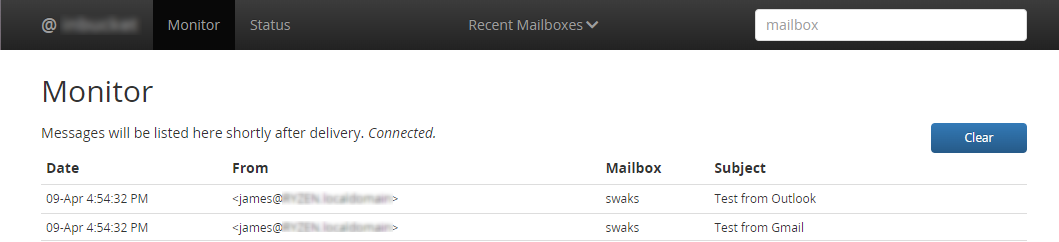
Web-interface features:
- List messages in a mailbox
- Displays content of a particular message
- Displays source of a message (headers + body)
- Displays HTML version of a message (in a new window)
- List MIME attachments with buttons to display or download
- Delete a message
- Monitor: a real time display of all received messages
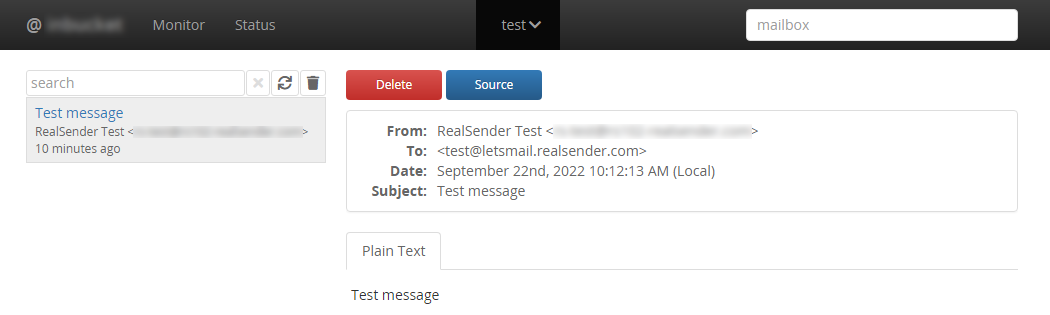
A working demo is available in our (free) postmaster tools area:
» inxbox demo temporary email
Request a free trial
inxbox app demo

inxbox app demo is a ready-to-use temporary mailbox
that receives any message
and keeps it in memory for an hour

!! all received messages are visible to anyone !!
Try it yourself now! (1)
- send a message to: [yourname]@inxbox.realsender.com
- open https://inxbox.realsender.com/monitor and check check for reception
(use Google Chrome browser > New Incognito Window or Microsoft Edge browser)
Try it yourself now! (2) with your own domain
- change/add the MX record of your domain to:
MX “10 inxbox1.realsender.com”
- Send a message to: yourname@yourdomain
- open https://inxbox1.realsender.com/monitor and check check for reception
(use Google Chrome browser > New Incognito Window or Microsoft Edge browser)
pay attention: the associated domain name is different from the previous point
Download the messages via pop3
- configure your email client with the following settings
- Server Type: POP Mail Server
- Server Name (1): inxbox.realsender.com - Port: 110 (Default)
- Server Name (2): inxbox1.realsender.com - Port: 110 (Default)
- User Name: only “yourname” within the recipient address
- Password: any value is accepted